 KALU AUDIO
Triodia
The complete vocal chain, with the warmth of a real tube. Nine tubes simulated by mathematical circuit models, plus de-esser, echo and plate reverb, in a single plugin.
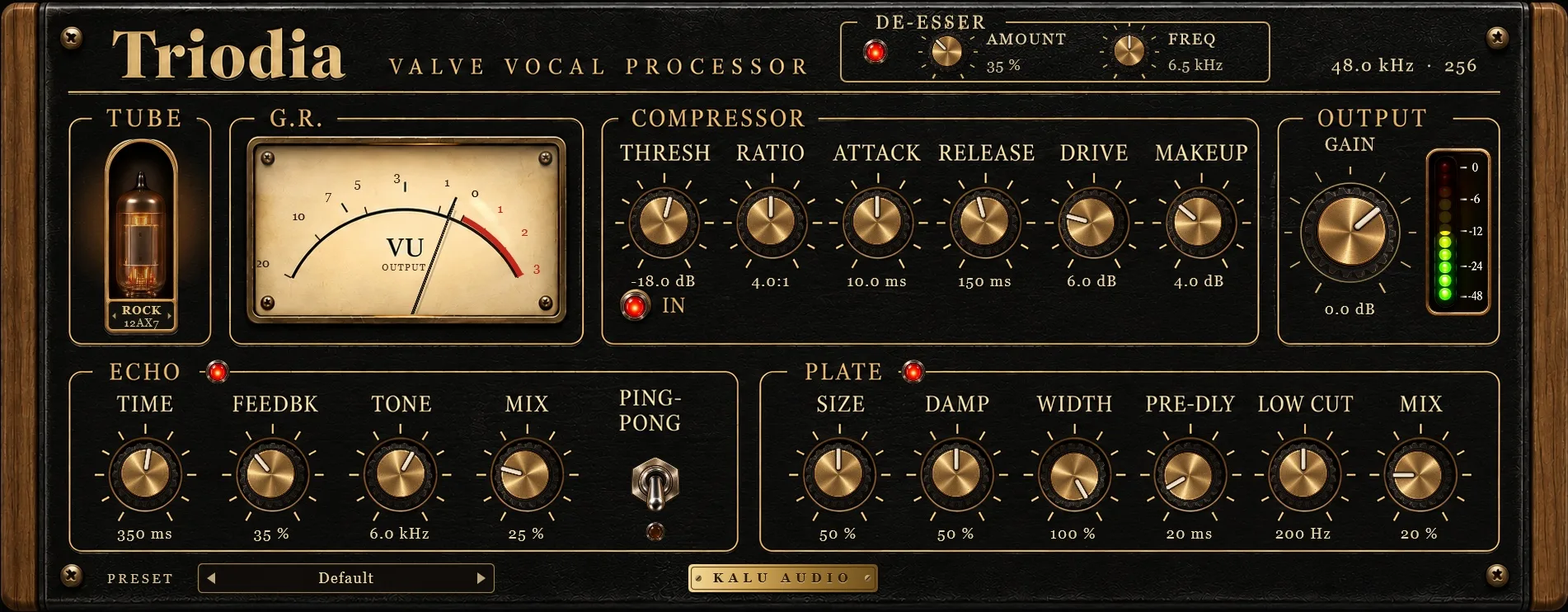
Everything a vocal needs, in the right order
The signal flows through five stages, each with its own on/off switch.
De-esser
Detects sibilance by comparing high-frequency energy with the whole voice, and softens only the "S" sounds without dulling the brightness.
Tube compressor
Soft knee, optical-style adaptive release and a simulated tube stage, with 9 tubes to choose from.
Echo
Delay whose repeats darken on every pass, keeping the vocal up front. Includes a stereo ping-pong mode.
Plate
Plate reverb based on Jon Dattorro's classic algorithm, with pre-delay and a low cut to keep things clear.
Output
Final gain with an LED peak meter and a VU that switches between output level and gain reduction.
Nine real tubes, simulated by physics
No generic "warmth filter". Each tube is computed from its electrical characteristics, using the same mathematical model engineers use in circuit simulations. Gain, headroom and harmonics aren't hand-tuned: they emerge from the physics of each one.
High gain, saturates early. The classic preamp warmth.
Gain 65× · bias −0.9 VLow gain and lots of headroom. Subtle, almost transparent color.
Gain 12× · bias −5.5 VA middle ground between presence and clarity.
Gain 39× · bias −2.1 VClassic microphone preamp pentode. The most characterful of the list.
Gain 184× · bias −2.6 VA big triode, full-bodied and clean.
Gain 14× · bias −6.7 VLinear and open. Ideal for brightness without grit.
Gain 22× · bias −3.7 VRemote cutoff, inspired by classic vari-mu compressors. Gradual, soft saturation.
Gain 3.9× · bias −9.4 VAlso remote cutoff, with a soft, silky character.
Gain 5.6× · bias −9.6 VA sturdy output tube. The cleanest and firmest of them all.
Gain 11× · bias −8.0 VA real tube, computed sample by sample
Triodia doesn't imitate the "feel" of a tube. It solves the electrical equations of a complete tube stage, the way an engineer would in a circuit simulator.
The Koren model
At the heart of the simulation is the model published by engineer Norman Koren ("Improved VT models for SPICE simulations"), the most widely used reference for simulating tubes. It describes a tube's plate current from its grid and plate voltages, with five parameters that define the "personality" of each type.
Ip = ( E1Ex / Kg1 ) · ( 1 + sgn E1 )
A complete stage, not just the tube
The tube sits in a classic common-cathode amplifier stage: high-voltage supply (B+), plate resistor, bias computed automatically for each type, and grid conduction when the signal swings positive. The plate voltage is solved numerically for every signal level.
- Miller effect
- →
- Grid
- →
- Tube (Koren)
- →
- Transformer
- →
- Coupling
What makes it feel real
Miller effect: the grid-to-plate capacitance is multiplied by the stage gain, rounding off the highs. Computed for each tube from its datasheet values. That's why on the EF86 (a pentode) it's practically zero, just like the real thing.
Output transformer: the core saturates with strong lows, adding weight, and its resonance softens the extreme highs.
2x oversampling: saturation is computed at double rate, so the generated harmonics don't fold back as digital distortion (aliasing).
Measured, not promised
These are the values the model computes for each tube, and the distortion measured in the plugin with a 1 kHz tone at −12 dBFS, using the compressor's default settings.
| Tube | Gain | Bias | THD Drive 6 dB | THD Drive 18 dB |
|---|---|---|---|---|
| ROCK12AX7 | 65× | −0.89 V | 0.69% | 2.75% |
| SMOOTH12AU7 | 12× | −5.52 V | 0.23% | 0.91% |
| CLEAN12AT7 | 39× | −2.11 V | 0.61% | 2.43% |
| VINTAGEEF86* | 184× | −2.64 V | 1.10% | 4.35% |
| LARGE6SN7* | 14× | −6.74 V | 0.19% | 0.77% |
| AIRECC88 | 22× | −3.72 V | 0.23% | 0.90% |
| GLUE6386* | 3.9× | −9.44 V | 0.40% | 1.60% |
| SILK6BC8* | 5.6× | −9.61 V | 0.38% | 1.51% |
| PUNCH12BH7* | 11× | −8.03 V | 0.16% | 0.63% |
THD = total harmonic distortion. In the triodes, about 99% of it is 2nd harmonic, the "warm" signature of tubes.
* 12AX7, 12AU7, 12AT7 and ECC88 use the parameters published by Koren. Tubes marked with an asterisk use parameters estimated from their datasheet curves, faithful to the behavior of each type.
Remote-cutoff tubes
GLUE (6386) and SILK (6BC8) are "remote-cutoff" tubes, famous in the classic vari-mu compressors of the 1950s and 60s. Their grid loses control gradually, so the gain falls smoothly instead of cutting off all at once. Triodia models this behavior, which gives them the softest saturation of the list.
Built to sound good and to be used
A tube that reacts
The tube on the panel glows with the vocal and the DRIVE, and goes dark when the compressor is switched off.
A real VU
Classic VU ballistics. Click the meter to switch between output level and gain reduction.
2x oversampling
The tube stage runs at double rate, avoiding digital distortion (aliasing) when it saturates.
13 factory presets
Pop, Rock, Ballad, Soul, Rap, Podcast, Voice-Over, Hot Tube, Vintage Radio, Slapback, Dub Echo and Huge Plate. All level-matched, so you compare tone only.
Three skins
Black, red and olive green. Your choice is saved with the project.
Resizable window
Make the interface bigger or smaller freely, keeping its proportions.
Mono and stereo
Takes a mono track and returns stereo, with the echo and reverb widening the vocal image.
Triodia is free
Download, install and use it in as many projects as you like.
Triodia runs on Windows PCs. Open this page on your computer to download it.
On a Mac? Triodia is Windows-only for now. A Mac version is planned: leave your e-mail below and we'll tell you when it's out.
Version 1.1.3 · Windows 10/11 64-bit · Mac coming soon
New in 1.1.3: built with the VST 3.8 SDK, now under the MIT license (sound unchanged). New in 1.1.2: knob values are shown rounded and clean (no more "66.9999 %"). New in 1.1.1: switches and settings are always restored exactly when a project is reopened. New in 1.1.0: an About screen, an optional check for new versions and support links (click the KALU AUDIO badge in the plugin). How the update check works
Chrome may warn that the file "isn't commonly downloaded". That's normal for new software from independent developers: click Download suspicious file to keep it. Why does this happen?
Requirements
- System
- Windows 10 or 11, 64-bit
- Formats
- VST3 and Standalone app
- Sample rates
- Any rate supported by your DAW or audio interface
- Channels
- Mono, stereo, or mono to stereo
- Latency
- Minimal, reported to the DAW, which compensates automatically
In three steps
- Download and run the installer. If Windows shows "Windows protected your PC", click More info → Run anyway. This happens with software from independent developers.
- The plugin is installed to
C:\Program Files\Common Files\VST3, the standard folder every DAW scans. - Open your DAW, rescan your plugins and look for Kalu Audio → Triodia.
Frequently asked questions
Is Triodia really free?
Yes. No trial period, no usage limits and no sign-up required.
Does it work on Mac?
For now, Windows 64-bit only. A Mac version (VST3 and AU) is planned.
Why is the VU stuck at 0?
It's probably in GAIN REDUCTION mode: the needle rests at 0 and only drops when the compressor reduces the level. Click the meter to go back to OUTPUT mode, or lower THRESH so the compressor kicks in.
Where do I start?
With the presets: click the preset name at the bottom of the plugin and pick the style closest to yours (Pop Vocal, Podcast, Ballad...). Then adjust THRESH until the compression VU shows a few divisions, and set the echo and plate MIX to taste. A * next to the name means you've changed the preset.
Which tube should I use?
Start with ROCK (12AX7) for obvious warmth, or SMOOTH (12AU7) for subtle color. For soft, "glued" compression, try GLUE or SILK. Turn up the DRIVE to hear the difference between them.
Chrome says the file "isn't commonly downloaded and may be dangerous". Is it safe?
Yes. Chrome shows this for any program that few people have downloaded so far and that isn't digitally signed yet, which is the case for most new software from independent developers. It isn't a virus detection. Click Download suspicious file (in some versions, the arrow next to the warning → Keep) and the file is saved normally. The warning disappears as more people download Triodia.
To confirm your copy is the original, compare its SHA-256 fingerprint (in PowerShell: Get-FileHash Triodia-1.1.3-Windows.exe) with this one:a943571c8606870b042181945da6a103c4dfa6806318d0d27308d47a5e51bf95
Windows said the installer might be dangerous. Is it safe?
Yes. The SmartScreen warning appears for software that doesn't have a paid digital signature yet, which is common with independent developers. Always download from this official site, click More info → Run anyway and follow the installer.
Does Triodia connect to the internet?
Only to check for new versions, at most once a day, in the background (never on the audio thread). It sends just the Triodia version and plugin format, nothing about you or your projects, and if a newer version exists a small notice appears in the footer. You can turn it off: click the KALU AUDIO badge at the bottom of the plugin and untick Check for updates automatically.
How can I support Triodia?
Triodia is free and doesn't ask for anything. If you'd like to help, you can leave a tip on Ko-fi (card or PayPal, no account needed). It goes straight into updates and the Mac version. Sharing Triodia with friends, or telling us what you made with it, helps just as much.
How do I uninstall it?
In Settings → Apps, look for Triodia and click Uninstall. Both the plugin and the app are removed.
I found a problem. How do I report it?
Email kaluaudio@gmail.com with your DAW, your Windows version and what happened. A screenshot helps if you can include one.
Can I use it as an app, without a DAW?
Yes. The installer includes a Standalone version. Choose your audio interface under Options → Audio/MIDI Settings.